
When evaluating 2D vs 3D floor plan rendering for real estate marketing, the decision hinges on your audience’s technical literacy, the project’s sales stage, and the communication objective: 2D orthographic floor plans deliver measurement-accurate spatial documentation preferred by architects, contractors, and planning authorities, while 3D floor plan renders – produced through physically based rendering (PBR) engines with furniture placement, material finishes, and ambient lighting simulation – generate the emotional spatial comprehension that converts prospective buyers and tenants who cannot interpret technical drawings. For developers and marketing teams operating in competitive residential or commercial pre-sales environments, the evidence consistently favors 3D rendered floor plans as the primary consumer-facing deliverable, with 2D plans retained for construction documentation and regulatory submissions.
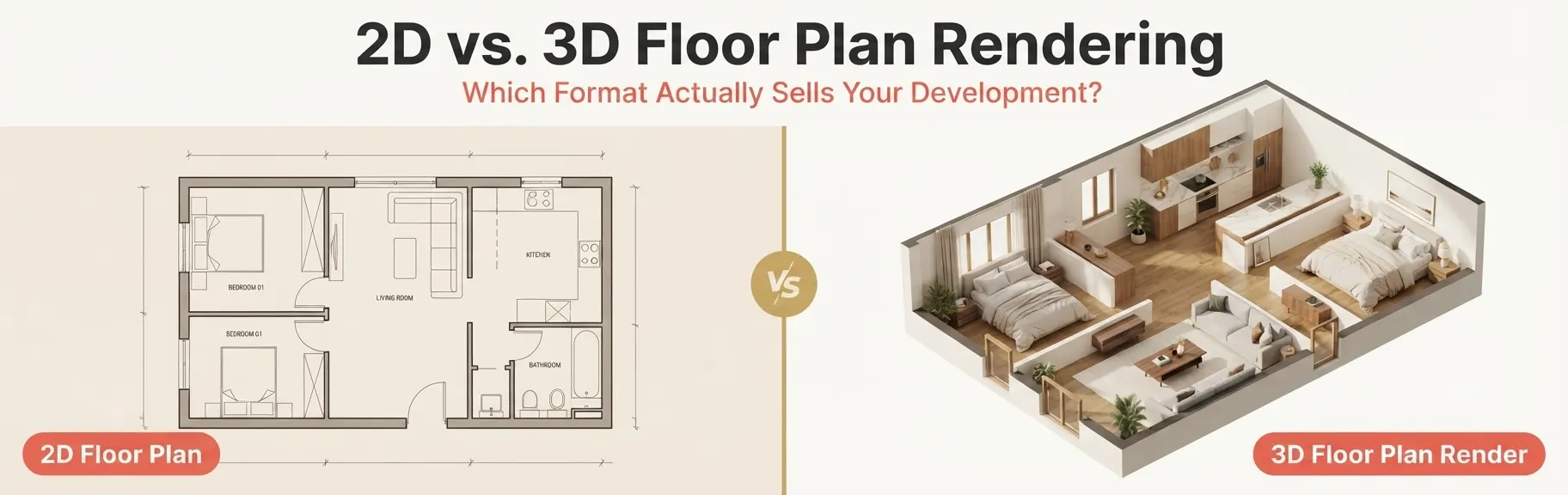
Understanding where each format delivers maximum value – and where it falls short – is the strategic question this guide answers in full.
Developers who already use professional photorealistic real estate rendering and visualization services recognize floor plan rendering as a core component of the marketing stack, not an optional add-on. Whether you are launching a residential community, a mixed-use development, or a commercial office project, the floor plan format you choose directly affects how quickly buyers understand the space, engage with the listing, and ultimately commit to a purchase.
What is a 2D Floor Plan?
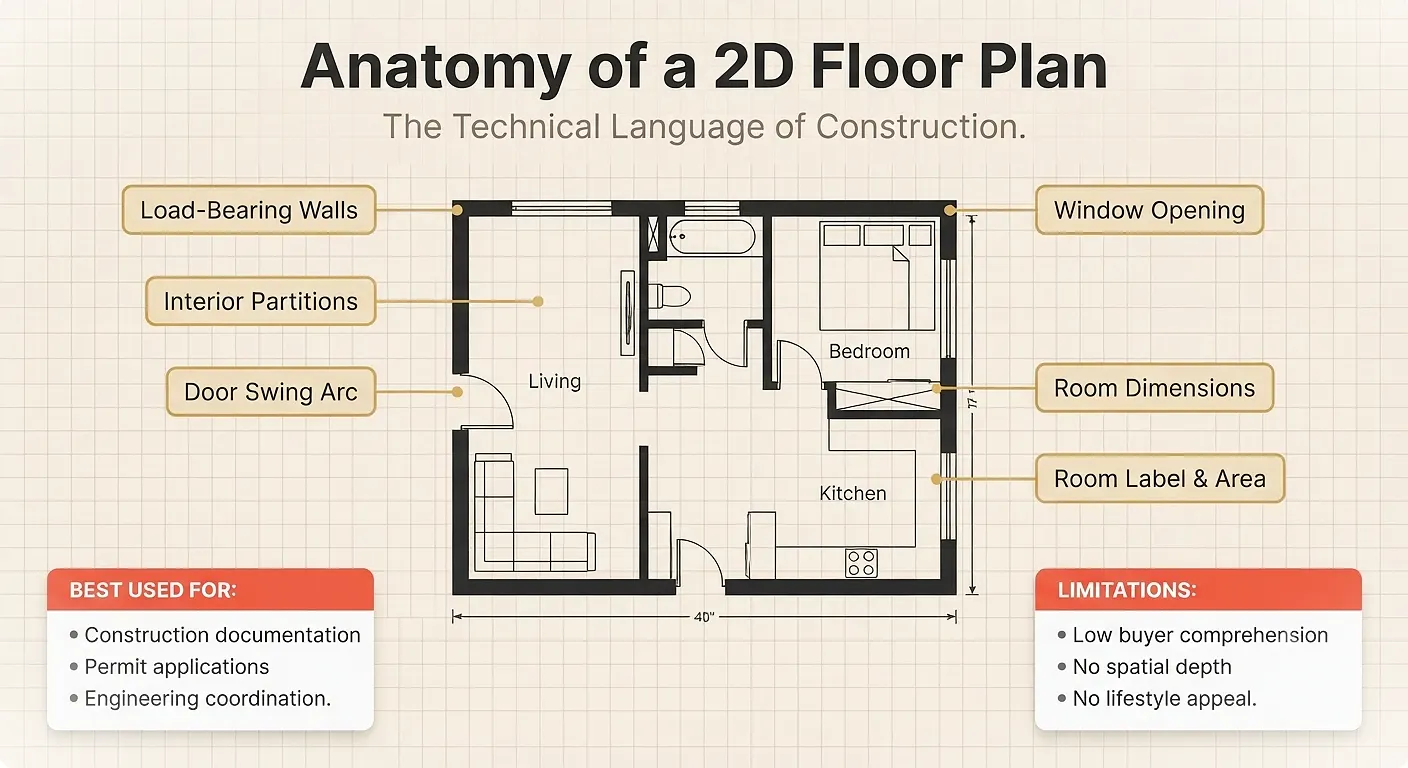
A 2D floor plan is a flat, orthographic top-down projection of a building’s interior layout, drawn to a defined scale. It communicates spatial structure through standardized architectural notation rather than visual realism.
Key Characteristics of 2D Floor Plans
- Precise dimensional accuracy: Room widths, lengths, door swings, and wall thicknesses are all drawn to scale
- Standardized architectural symbols: Doors, windows, stairs, plumbing fixtures, and structural columns use industry-standard notation
- Black and white or lightly colored linework: The visual language prioritizes precision over aesthetics
- Minimal furniture representation: Either shown as generic outlines or omitted entirely
- Clean, fast production: A single-level 2D plan typically takes one drafter one to two days to complete
What 2D Floor Plans Communicate Well
- Structural wall positions and load-bearing elements
- Room-to-room adjacencies and circulation flow
- Net floor area calculations and room dimensions
- Door and window schedules
- Compliance with building codes and zoning regulations
What 2D Floor Plans Cannot Communicate
- The perceived spaciousness of a room
- Ceiling height and vertical volume
- Material finishes, flooring patterns, or color palette
- Furniture scale relative to the room
- Natural light quality and shadow behavior
The limitation is fundamental: a 2D floor plan is a technical document written in a language that architects, engineers, and builders understand fluently – but that most buyers, investors, and tenants cannot interpret without assistance.
What is 3D Floor Plan Rendering?
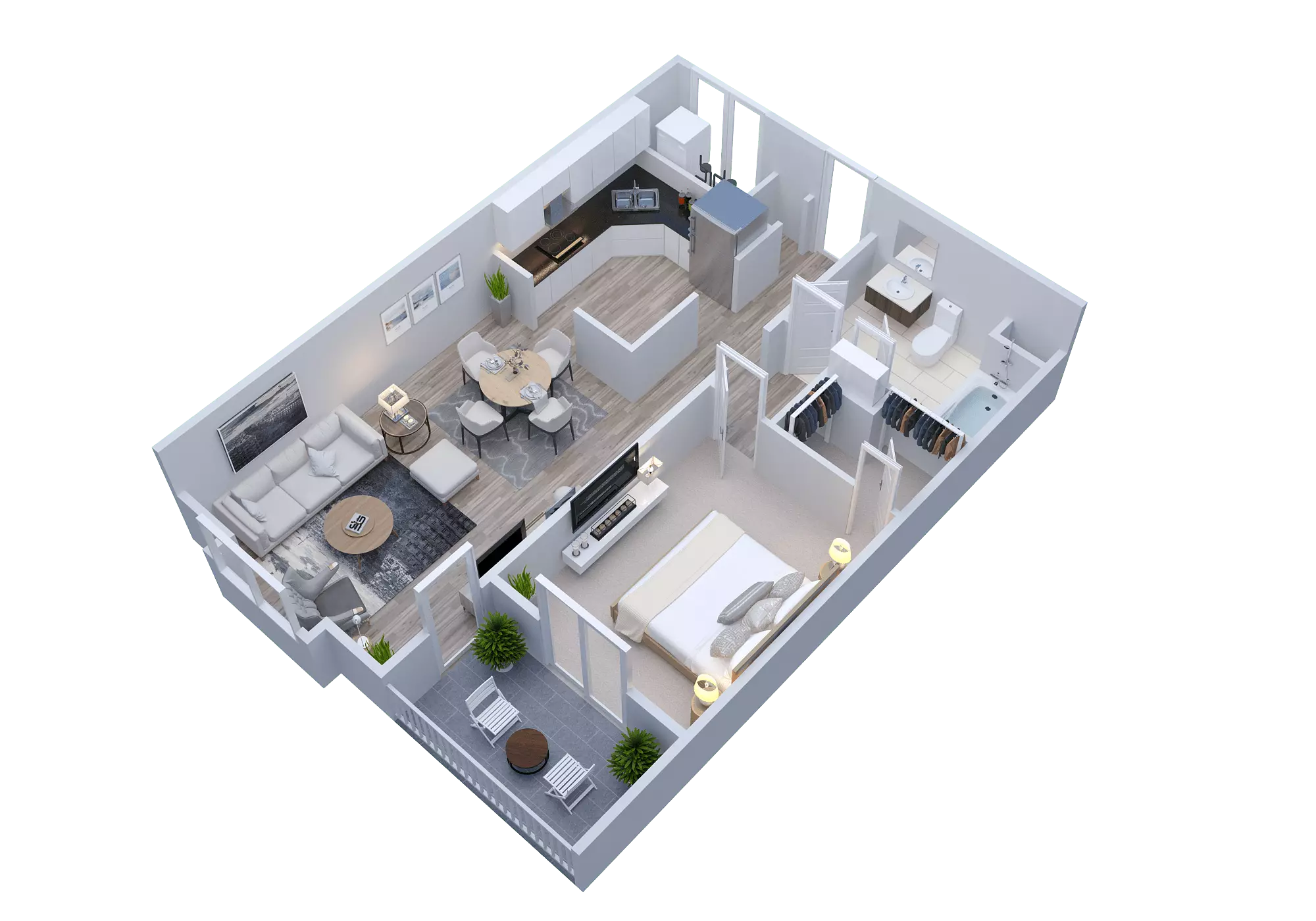
A 3D floor plan rendering is a photorealistic or stylized three-dimensional visualization of a property’s interior layout, produced using rendering software such as 3ds Max, SketchUp, or dedicated floor plan rendering tools. It combines the spatial accuracy of a 2D plan with the visual immediacy of an interior photograph.
What 3D Floor Plan Rendering Delivers
Beyond Dimensions – Into Experience.
Furniture Placement
Furniture Placements – Into Experience.
Material Finishes
Material Finishes – Into Experience.
Ambient Lighting
Ambient Lighting
True-to-Scale Accuracy
Scale-to-Scale Accuracy
Instant Buyer Comprehension
Instant Buyer Comprehension
Social Media Ready
Marketing Usability
Key Characteristics of 3D Floor Plan Renders
- Perspective depth: The isometric or axonometric camera position provides a three-dimensional view of the entire space from above
- Furniture placement and scaled objects: Sofas, dining tables, beds, and kitchen islands sit in their correct positions, helping viewers understand how the space actually functions
- Realistic material finishes: Hardwood floors, tile patterns, carpet textures, and wall colors are rendered with physical accuracy
- Ambient lighting simulation: Natural light from window positions and ceiling fixture illumination creates the visual warmth that makes a space feel livable
- Color-coded zoning: Different rooms are often rendered in distinct finish families to make spatial zones immediately legible
As noted by WorldPropertyJournal, for developers and property marketers, 3D floor plan rendering turns technical layouts into clearer visuals that show room flow, furniture scale, and the overall relationship between spaces before a buyer visits or purchases.
2D vs 3D Floor Plan Rendering: The Core Comparison
This is the question most developers and marketing teams actually need answered. Here is a structured, objective breakdown:
| 2D Floor Plan | Criteria | 3D Rendering |
|---|---|---|
| ● ● ● ● ● | Buyer Spatial Comprehension | ● ● ● ● ● |
| ● ● ● ● ● | Measurement Accuracy | ● ● ● ● ● |
| ● ● ● ● ● | Furniture & Finish Representation | ● ● ● ● ● |
| ● ● ● ● ● | Emotional Lifestyle Appeal | ● ● ● ● ● |
| ● ● ● ● ● | Online Listing Engagement | ● ● ● ● ● |
| ● ● ● ● ● | Pre-Sales Conversion Support | ● ● ● ● ● |
| ● ● ● ● ● | Construction Document Use | ● ● ● ● ● |
| ● ● ● ● ● | Social Media Usability | ● ● ● ● ● |
| Evaluation Criteria | 2D Floor Plan | 3D Floor Plan Rendering |
|---|---|---|
| Spatial comprehension for non-technical buyers | Low | Very High |
| Measurement accuracy | Very High | High (scale-accurate) |
| Furniture and finish representation | None to minimal | Full, photorealistic |
| Emotional impact and lifestyle appeal | None | Very High |
| Suitability for construction documents | Excellent | Not applicable |
| Suitability for online property listings | Moderate | Excellent |
| Suitability for investor presentations | Low to Moderate | High |
| Pre-leasing and pre-sales effectiveness | Low | Very High |
| Production cost | Low ($50-$250 per floor) | Moderate ($299-$800 per floor) |
| Production turnaround | 1-2 days | 3-7 business days |
| Planning and building permit submissions | Required | Not accepted as substitute |
| Social media marketing usability | Low | Very High |
The table makes the use case clear: these formats are not interchangeable. They serve fundamentally different audiences and communication goals.
When 2D Floor Plans Are the Right Choice
Despite the marketing advantages of 3D renders, there are specific situations where 2D plans remain the correct and often legally required deliverable.
Architectural and Construction Documentation
Building permit applications, construction coordination sets, and structural engineering reviews all require dimensioned, annotated 2D plans prepared by a licensed architect or drafter. A 3D rendered floor plan has no legal standing as a construction document.
Early-Stage Design Development
During schematic design, when the team is still iterating on room configurations and circulation layouts, 2D plans are the most efficient format. Changes take minutes rather than hours, and the focus is on spatial logic, not visual presentation.
Technical Client Briefings
When briefing a contractor, a mechanical engineer, or a quantity surveyor, a 2D plan communicates more useful information more efficiently than a rendered visualization.
Budget-Constrained Single-Property Listings
For a single residential resale listing where the marketing budget is limited and the property already exists, a clean, colored 2D plan with basic furniture may be sufficient – especially if professional photography is already providing the visual appeal.
Understanding how to prepare home plans for 3D exterior rendering illustrates this point clearly: 2D plan packages are the source input for all rendering workflows, making their accuracy foundational to every downstream visual deliverable.
When 3D Floor Plan Rendering is the Right Choice
For most real estate marketing applications, 3D floor plan rendering delivers a measurably superior outcome. Here is when it becomes not just preferable but strategically essential.
Pre-Construction Sales Campaigns
When a building does not yet exist, buyers must make purchasing decisions entirely based on visual representations. A 2D plan provides dimensions. A 3D rendered floor plan provides the visceral spatial experience that triggers a purchase decision. According to research from virtualstaging.com, 82% of home buyers are more likely to view a property if it includes a floor plan they find compelling.
Online Property Listings on MLS and Portal Platforms
Digital property portals prioritize listings with rich visual content. A 3D floor plan rendered with furniture, finishes, and lighting generates significantly more time-on-listing engagement than a flat line drawing. Industry data from cubi.casa shows that listings with enhanced floor plan formats boost engagement by over 30%.
Multi-Unit Residential Development Marketing
When marketing a condominium tower, townhouse community, or apartment complex, buyers are comparing multiple unit types simultaneously. A 3D rendered floor plan for each unit type eliminates the spatial confusion that 2D plans create for non-technical audiences, and directly reduces the time sales teams spend explaining layouts in person.
Commercial Leasing Presentations
Commercial tenants evaluating office or retail spaces need to understand how their business operations will function within the envelope. A 3D rendered floor plan showing workstation layouts, meeting room configurations, and circulation patterns communicates operational viability in seconds.
Developer Investor Decks and Equity Presentations
Equity partners and debt lenders evaluating a development project want to understand the product before they commit capital. A 3D rendered unit floor plan included in an investor presentation communicates product quality and market positioning far more effectively than technical drawings. This is directly connected to How Top Real Estate Developers Win Approvals and Sales Using 3D Renderings throughout the capital stack.
The Marketing Performance Gap: 2D vs 3D Floor Plan Data
The performance difference between the two formats in consumer-facing marketing contexts is not marginal – it is structural. Here is what the data shows:
| Marketing Channel | 2D Floor Plan Performance | 3D Floor Plan Rendering Performance |
|---|---|---|
| Online listing time-on-page | Baseline | 30-40% uplift (cubi.casa) |
| Buyer comprehension of spatial flow | Low – requires interpretation | Up to 60% faster comprehension (coohom.com) |
| Likelihood buyer engages with listing | Moderate | 82% more likely if plan is compelling (virtualstaging.com) |
| Pre-sales conversion support | Limited | Core conversion driver |
| Social media shareability (Instagram, Pinterest) | Very Low | High – visually compelling format |
| Agent perceived value by sellers | Standard | Differentiator: 71% of sellers prefer agents offering enhanced visual plans (homediary.com) |
The pattern here is consistent: wherever the audience is a consumer rather than a technical professional, 3D floor plan rendering outperforms 2D plans on every engagement and conversion metric.
Step-by-Step: How a 3D Floor Plan Rendering is Produced
For developers briefing a rendering studio for the first time, understanding the production workflow helps set accurate timeline and revision expectations.
Step 1: Submit the 2D base plan The rendering studio receives your architect’s 2D floor plan in CAD, PDF, or image format. This is the geometric foundation for the 3D model. Accuracy at this stage determines accuracy throughout.
Step 2: 3D model construction The drafting team builds the three-dimensional geometry of the floor plate – walls, openings, ceiling height, and structural elements – from the 2D source plan.
Step 3: Furniture and fixture placement Standard or client-specified furniture sets are placed within each room at correct scale. Kitchen cabinetry, bathroom fixtures, and built-in storage are modeled in position.
Step 4: Material and finish assignment Flooring, wall finishes, countertops, and soft furnishings are applied using physically based texture maps. Material choices can reflect the project’s actual specification or a market-positioned design scheme.
Step 5: Lighting setup Natural light sources from window positions are simulated, and ceiling fixtures are activated. The lighting setup determines the warmth and livability of the final render.
Step 6: Rendering and post-production The scene is rendered at high resolution. Post-production in Photoshop refines color grading, adds soft shadows, and ensures the output is publication-ready.
Step 7: Delivery and revision The final JPG and/or layered PSD files are delivered. Most professional studios include one to two revision rounds within the project fee.
Reviewing the difference between 3D rendering and 3D modeling clarifies the distinction between Steps 2-3 (modeling) and Steps 5-6 (rendering) within this workflow.
Pricing: 2D Floor Plan vs. 3D Floor Plan Rendering
Understanding the cost difference helps developers budget correctly and evaluate the return on investment.
| Deliverable Type | Complexity Level | Typical Price Range (USD) |
|---|---|---|
| Basic 2D linework plan (no furnishing) | Low | $50 – $150 per floor |
| Furnished 2D colored plan | Low to Medium | $150 – $300 per floor |
| Basic 3D floor plan render (standard furnishing) | Medium | $299 – $500 per floor |
| Full 3D floor plan render (custom finishes, lighting) | Medium to High | $500 – $800 per floor |
| 3D floor plan with exterior site context | High | $800 – $1,500 |
| Interactive 3D floor plan (web-embedded) | High | $1,500 – $4,000+ |
The price difference between a furnished 2D plan and a professionally rendered 3D floor plan is typically $200-$500 per unit type. For a developer marketing a 50-unit residential building with five distinct unit types, the total additional investment for 3D renders over 2D plans is approximately $1,000-$2,500 – a marginal budget line relative to a development of that scale.
For a detailed current pricing reference, the real estate rendering price list provides transparent market-rate guidance across all visualization deliverable types.
Common Mistakes Developers Make When Choosing Between 2D and 3D Floor Plans
These are the errors that cost developers time, money, and marketing performance.
Mistake 1: Using 2D Plans as the Primary Consumer-Facing Asset
The most common and costly error: commissioning professional exterior renderings and interior visualizations, and then including a flat 2D plan as the floor plan element. Buyers who cannot interpret the 2D plan disengage from the listing or ask the sales team for clarification – both outcomes waste time and reduce conversion efficiency.
Mistake 2: Using 3D Renders as Construction Documents
A 3D rendered floor plan is not an architectural drawing. It does not contain dimensions, wall assembly notes, or code compliance annotations. Using it as a substitute for a proper architectural set in a planning submission or contractor briefing creates costly misunderstandings.
Mistake 3: Not Aligning the Floor Plan Format with the Sales Channel
A 3D floor plan render designed for a print brochure has different resolution and composition requirements than one designed for Instagram Stories or a web portal listing. Failing to specify the output channel during the briefing phase results in deliverables that work poorly in their intended context.
Mistake 4: Specifying Generic Furniture Instead of Market-Positioned Finishes
A 3D floor plan rendered with inexpensive-looking furniture and neutral finishes positions the unit visually at a lower market tier than the actual product warrants. The furniture and finish choices in a floor plan render are a positioning statement. Align them with the project’s target demographic and price point.
Mistake 5: Commissioning One Floor Plan Format and Ignoring the Other
The most strategically effective approach uses both: 2D plans for construction and regulatory workflows, and 3D renders for all consumer-facing marketing. These are complementary, not competing formats.
Expert Tips: Getting the Most from Your Floor Plan Rendering Investment
1. Create a consistent visual identity across floor plan renders and exterior renderings. The material palette, lighting mood, and furniture style used in your 3D floor plans should align with the exterior renderings, lobby visualizations, and amenity renderings. Consistent visual identity across all assets reinforces brand cohesion and builds buyer confidence. This is particularly important for developers selling properties faster with 3D renderings across a full marketing campaign.
2. Render representative unit types, not every unit. For multi-unit projects, commission full 3D renders for each unique unit type – studio, one-bedroom, two-bedroom, penthouse – rather than individual renders for each unit. Add a simple notation system showing how each standard plan applies to specific building floors or orientations.
3. Request both an isometric view and a room-level close-up. The isometric full-floor render shows the overall layout. A room-level close-up of the kitchen or living area at near-eye-level perspective adds emotional warmth and is highly effective for social media use.
4. Include furniture in all consumer-facing renders. An unfurnished 3D floor plan is almost as hard to interpret as a 2D linework plan. Furniture placement provides scale reference, demonstrates functional layout, and creates the lifestyle narrative that moves buyers from interest to intent.
5. Sequence the floor plan render with your full visualization package. The most effective marketing sequences show: exterior render – amenity renders – 3D floor plan – interior renders. This narrative arc takes the buyer from the building’s street presence through its shared spaces and into their specific unit – replicating the emotional journey of an in-person site visit.
2D vs 3D Floor Plan Rendering: Which Should Developers Prioritize?
The answer depends on the development type, sales stage, and target audience. Here is a practical decision matrix:
| Development Scenario | Recommended Floor Plan Format |
|---|---|
| Pre-construction residential for-sale units | 3D rendered floor plan – essential |
| Commercial pre-leasing campaign | 3D rendered floor plan – recommended |
| Single residential resale listing | Furnished 2D plan – acceptable; 3D preferred |
| Planning and building permit application | 2D architectural plan – required |
| Investor equity raise presentation | 3D rendered floor plan – high impact |
| Construction contractor briefing | 2D architectural plan – required |
| Real estate portal listing (Zillow, Realtor.com, CoStar) | 3D rendered floor plan – preferred |
| Interior design client presentation | 3D rendered floor plan – recommended |
| Architectural design review (internal team) | 2D plan – efficient for iteration |
| Sales gallery or display suite materials | 3D rendered floor plan – essential |
The common thread: whenever the audience is a consumer, an investor, or a non-technical stakeholder making a financial decision, 3D floor plan rendering delivers measurably superior outcomes.
For developers evaluating the full visualization toolkit, the best real estate 3D rendering software guide provides further context on the tools driving modern floor plan and exterior visualization workflows.
Frequently Asked Questions: 2D vs 3D Floor Plan Rendering
What is the difference between 2D vs 3D floor plan rendering?
A 2D floor plan is a flat, dimensioned top-down technical drawing that communicates room layout, wall positions, and measurements using architectural notation. A 3D floor plan rendering is a photorealistic or stylized three-dimensional visualization of the same space, showing furniture placement, material finishes, lighting, and spatial depth. The 2D plan serves construction and regulatory purposes; the 3D render serves marketing and sales communication purposes.
Which is better for real estate marketing, a 2D or 3D floor plan?
For consumer-facing real estate marketing, 3D floor plan rendering consistently outperforms 2D plans on every engagement metric. Buyers comprehend 3D floor plans faster, spend more time with listings that include them, and are more likely to progress toward a viewing or purchase. Research indicates 82% of buyers are more likely to engage with a listing that includes a floor plan they find easy to interpret.
How much does 3D floor plan rendering cost compared to 2D?
A basic furnished 2D floor plan costs approximately $150-$300 per floor. A professional 3D floor plan render costs approximately $299-$800 per floor, depending on complexity, furnishing level, and post-production requirements. The additional investment per unit type is typically $200-$500, representing minimal incremental cost relative to total marketing budgets.
Can I use a 3D floor plan render for a building permit application?
No. Building permit applications and construction document sets require dimensioned, annotated 2D architectural drawings prepared by a licensed architect or drafter. A 3D rendered floor plan is not accepted as a substitute for architectural construction documents in any jurisdiction.
How long does a 3D floor plan rendering take to produce?
A standard 3D floor plan render for a single residential unit typically takes 3-7 business days from brief confirmation to first draft delivery, depending on complexity and studio workload. Rush delivery is available from most professional studios at a premium.
Do I need both 2D and 3D floor plans for a development project?
Yes, in most cases. The 2D architectural plan is required for construction, permitting, and engineering coordination. The 3D rendered floor plan is essential for consumer marketing, pre-sales, leasing presentations, and investor materials. The two formats serve entirely different audiences and functions, and the most successful development marketing programs use both.
What software is used to create 3D floor plan renders?
Professional 3D floor plan renders are typically produced using 3ds Max, SketchUp, Revit with Enscape or Lumion, or dedicated floor plan platforms. The rendering engine – V-Ray, Corona, or Lumion – determines the final image quality. The choice of software affects turnaround time, detail level, and the studio’s ability to incorporate project-specific material specifications.
What file formats are delivered for a 3D floor plan rendering?
Standard deliverables include high-resolution JPG files (minimum 300 DPI for print) and screen-optimized PNG or JPG files for digital use. Layered PSD files are often available for marketing teams that need to make minor adjustments. Interactive formats (web-embedded 3D or 360-degree) are delivered as embed codes or hosted links.
Let the Marketing Goal Drive the Format Decision
The 2D vs 3D floor plan rendering debate is only a genuine dilemma if you treat both formats as alternatives rather than complements. In practice, every development project needs both: 2D architectural plans to build the building, and 3D rendered floor plans to sell it.
The business case for 3D floor plan rendering in consumer-facing marketing is clear. Buyers comprehend spatial flow faster, engage with listings longer, and convert with less sales team friction when they can see a rendered representation of the space they are considering. For pre-construction projects in particular – where the 3D floor plan may be the only way a buyer can viscerally understand the unit they are committing to purchase – the format is not optional.
Investing in 3D floor plan rendering for your marketing program is a direct investment in pre-sales velocity, sales team efficiency, and competitive differentiation in a market where buyers are increasingly making decisions based entirely on digital assets before ever visiting a site.
Ready to transform your development’s floor plans from technical documents into conversion-driving marketing assets? Explore professional real estate rendering services that produce market-grade 3D floor plan renders built to close deals – not just describe dimensions.