
If you have ever wondered about the difference between 3D rendering and 3D modeling, you are not alone. These two terms get used interchangeably in the real estate and architecture industries – but they describe distinct processes with very different outputs. Understanding where one ends and the other begins can help you make smarter decisions about your visualization projects, communicate more clearly with your creative team, and get better results from every dollar you invest.
Whether you are a real estate developer, an architect, or a property marketer, this guide breaks down exactly what each process involves, how they work together, and why both matter for modern property marketing. Let’s start with the basics.
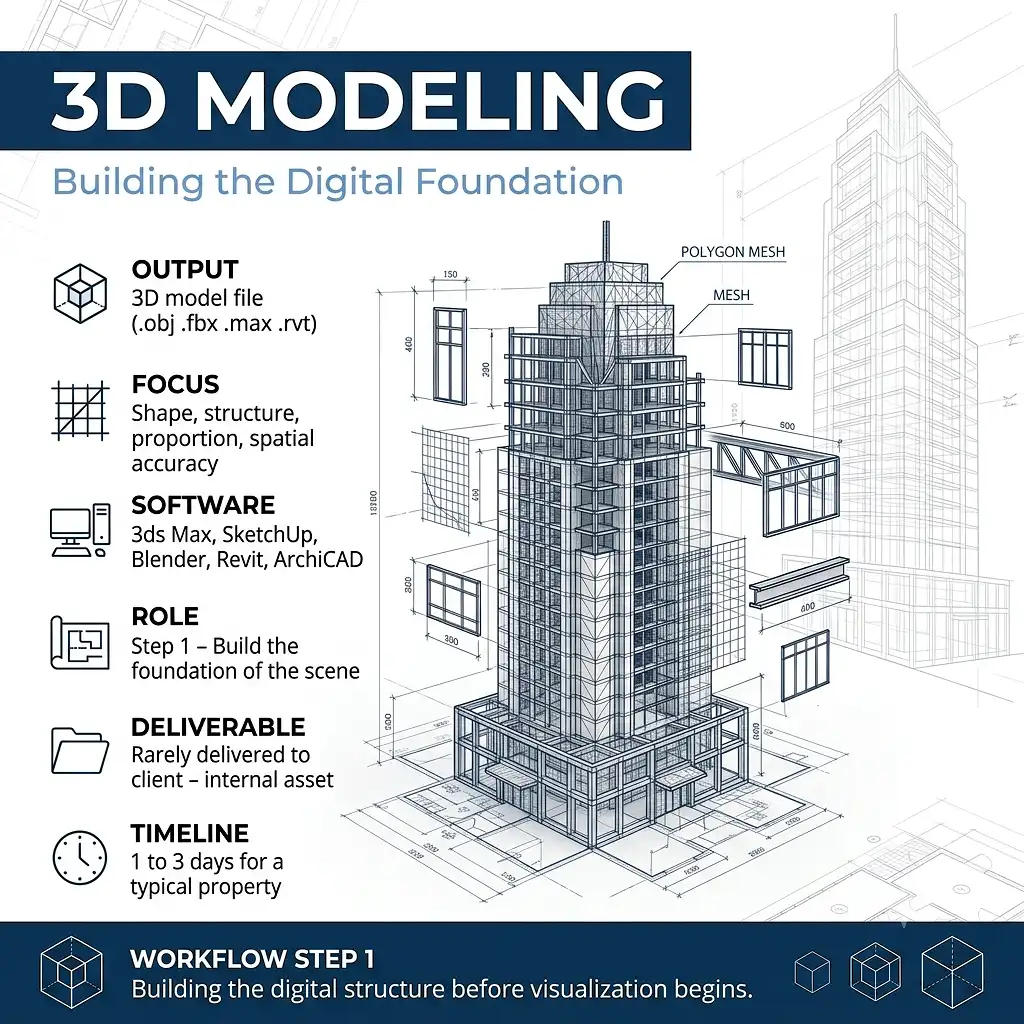
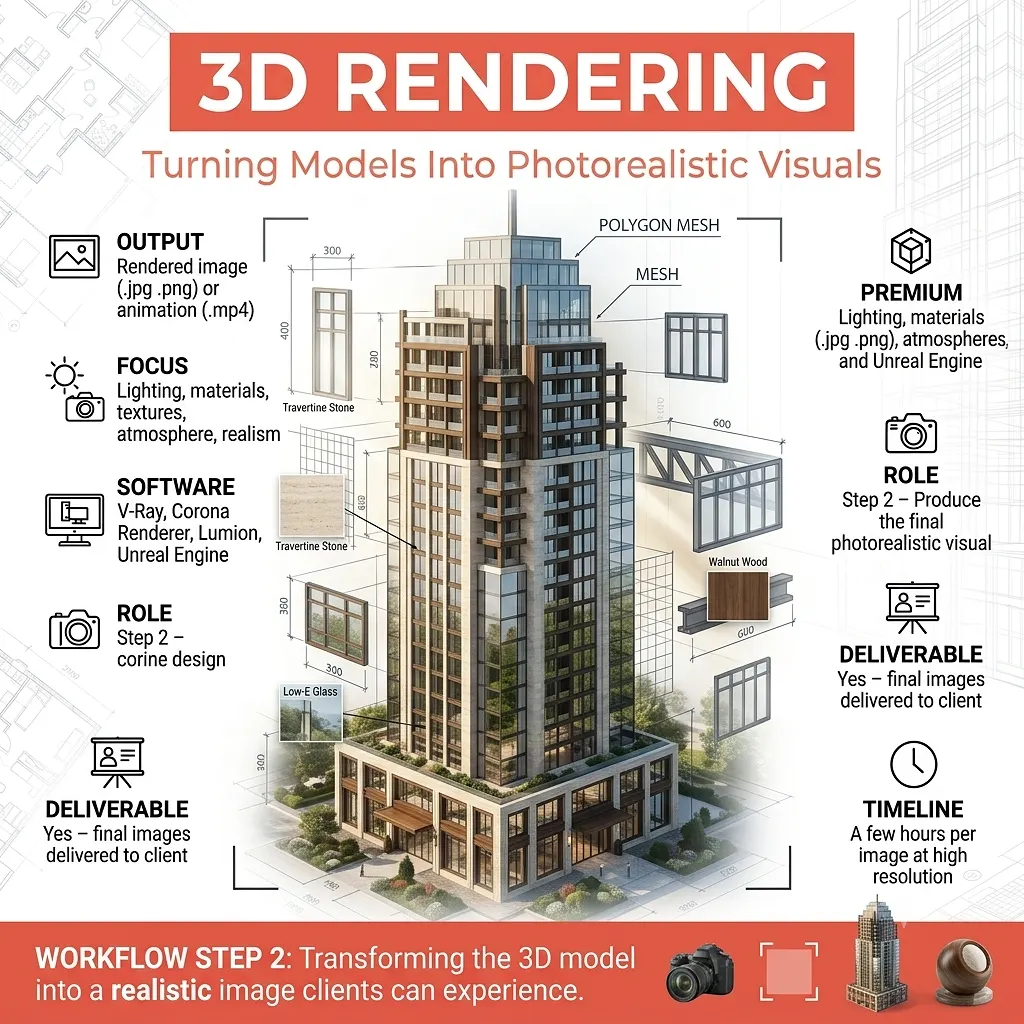
3D Modeling vs. 3D Rendering at a Glance
Before diving into the details, here is a simple summary of both terms:
- 3D Modeling: The process of building a digital three-dimensional object or scene using geometry, shapes, and structure.
- 3D Rendering: The process of converting that 3D model into a final photorealistic 2D image or animation by applying lighting, textures, and camera settings.
In other words, 3D modeling creates the structure, and 3D rendering creates the picture. Both are essential steps in real estate visualization – and one cannot exist meaningfully without the other.
What is 3D Modeling?
3D modeling is the foundational step of any architectural visualization workflow. It involves using specialized software to build a three-dimensional digital representation of a physical object, space, or entire building. Think of it as digital sculpting or construction: the artist defines every surface, edge, and dimension of the subject in a virtual environment.
What Does a 3D Modeler Actually Do?
A 3D modeler builds digital geometry that defines:
- The shape and structure of a building’s exterior walls, roof lines, and architectural details
- Interior layouts, including room dimensions, ceiling heights, stairways, and built-in features
- Furniture, fixtures, landscape elements, vehicles, and surrounding context objects
- Site plans and surrounding terrain for large-scale development projects
Common software tools used for 3D modeling in real estate include Autodesk 3ds Max, SketchUp, Revit, Blender, and ArchiCAD. Each platform has strengths depending on the complexity of the project and the intended output.
Key Characteristics of 3D Modeling
- Produces a wireframe or mesh-based digital object (not a finished image)
- Focuses on geometry, proportion, and spatial accuracy
- The output is a model file (.obj, .fbx, .max, .rvt, etc.) – not a picture
- Requires a separate rendering step to produce a viewable, photorealistic image
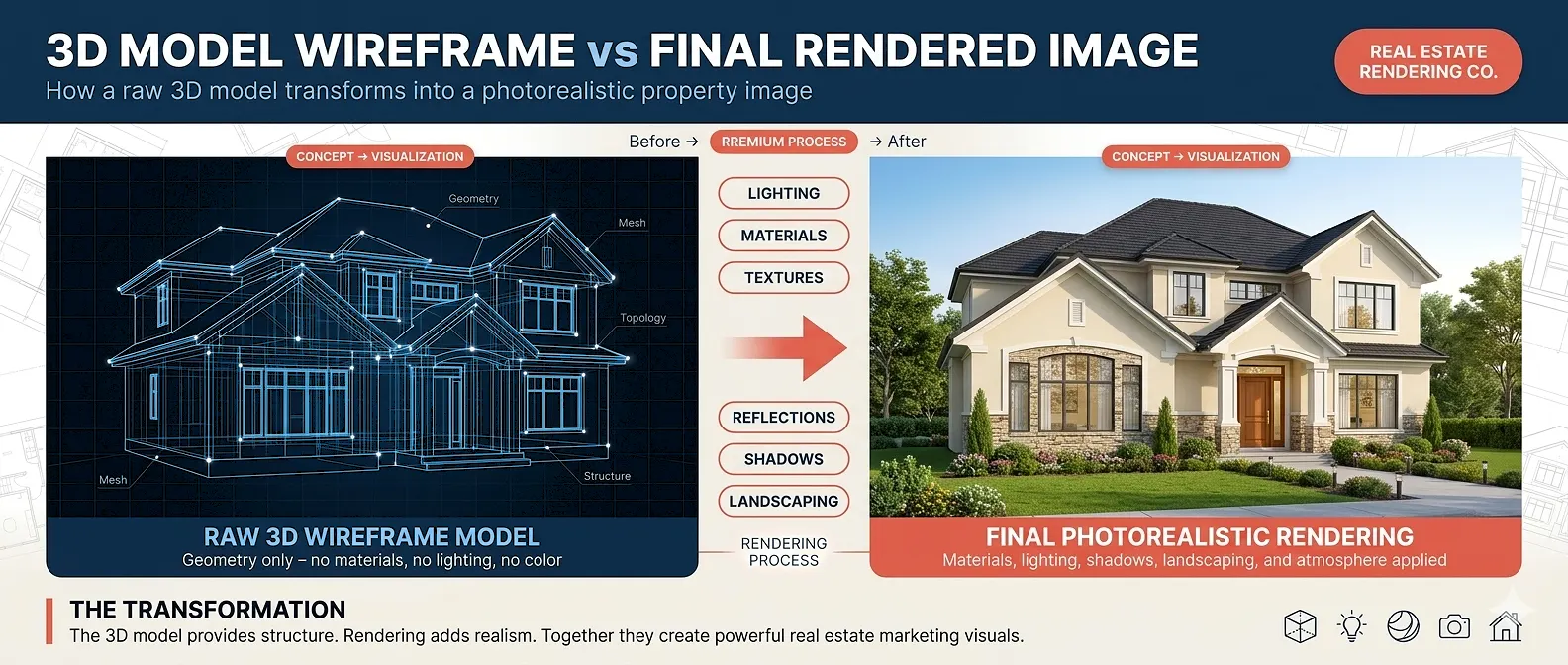
What is 3D Rendering?
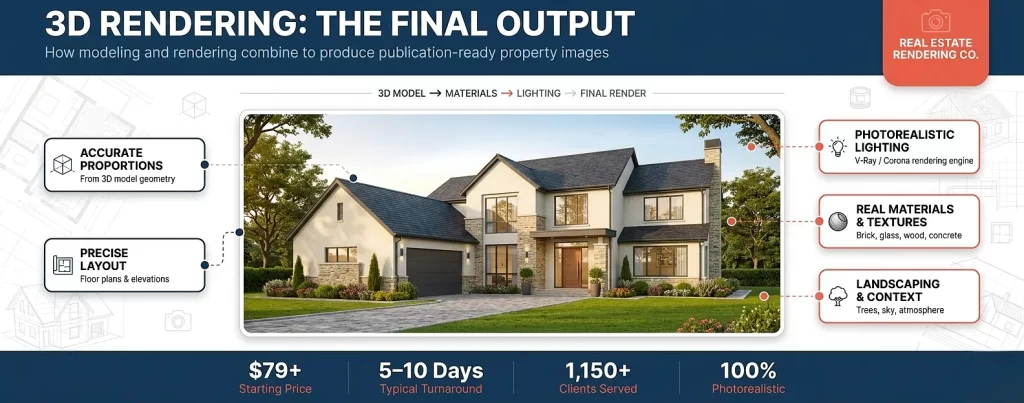
3D rendering is the step that transforms a raw 3D model into a finished, photorealistic image. Once a model has been built, a rendering artist applies materials, textures, lighting, shadows, atmospheric effects, and camera angles to produce an image that looks like a real photograph of the finished property.
This is precisely why professional real estate rendering services have become so valuable in the property industry. A high-quality rendering allows buyers, investors, and stakeholders to visualize a property before it is built – eliminating guesswork and accelerating sales cycles.
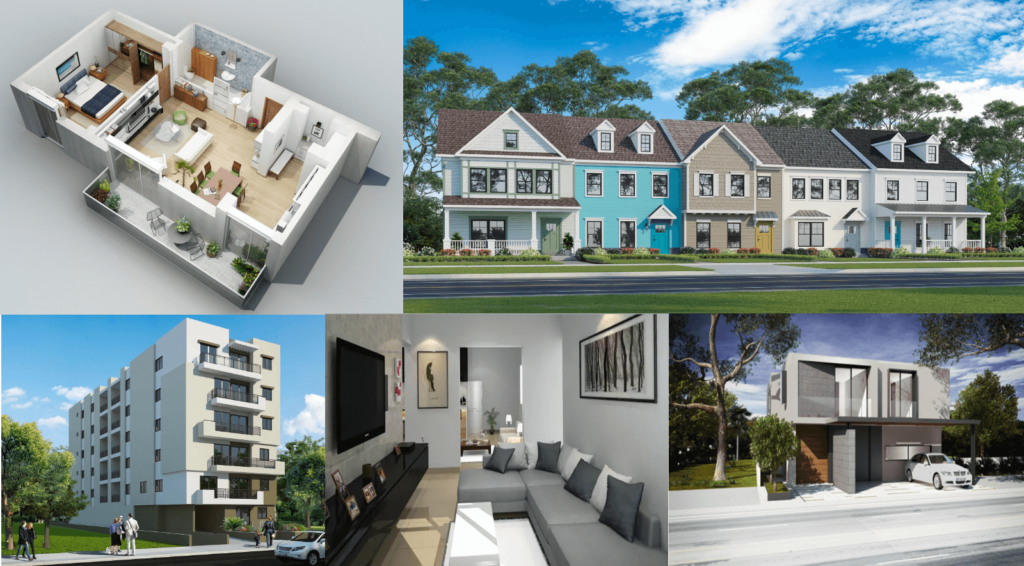
What Does the Rendering Process Involve?
The rendering phase includes several layers of artistic and technical work:
- Material and texture assignment – applying brick, glass, wood, concrete, and other real-world surface finishes to the 3D geometry
- Lighting setup – simulating natural sunlight, artificial interior lights, and time-of-day effects
- Camera positioning – selecting the optimal angles, focal lengths, and perspectives to best present the property
- Environment and context – adding landscaping, sky, neighboring structures, vehicles, and human figures
- Post-processing – color grading, contrast adjustment, and fine-tuning in software like Photoshop to produce the final polished image
Rendering engines such as V-Ray, Corona Renderer, Lumion, and Unreal Engine are used by professional studios to produce photorealistic outputs. The quality of the rendering engine and the skill of the rendering artist play the biggest role in determining the final image quality.
Types of 3D Rendering in Real Estate
- Exterior rendering: Photorealistic images showing the outside of a building from street-level perspectives or aerial views
- Interior rendering: Detailed images of rooms, lobbies, kitchens, and living spaces showing finishes, furniture, and lighting in full detail
- Aerial/bird’s-eye renderings: Top-down or elevated views useful for master plans and large developments
- 3D animation and virtual tours: Video walkthroughs of a property rendered frame-by-frame for interactive presentations
3D Modeling vs. 3D Rendering: Side-by-Side Comparison
The table below highlights the core differences between 3D modeling and 3D rendering to clarify each process:
| Category | 3D Modeling | 3D Rendering |
|---|---|---|
| Definition | Building the 3D digital structure/geometry of an object or scene | Converting the 3D model into a photorealistic 2D image |
| Primary Output | 3D model file (.obj, .fbx, .max, .rvt) | Rendered image (.jpg, .png, .tiff) or animation (.mp4) |
| Focus | Shape, structure, proportion, spatial accuracy | Lighting, materials, textures, atmosphere, realism |
| Software Examples | 3ds Max, SketchUp, Blender, Revit, ArchiCAD | V-Ray, Corona Renderer, Lumion, Unreal Engine |
| Can Be Viewed Without Rendering? | Yes, as a wireframe or viewport preview – but not photorealistic | N/A – rendering is the photorealistic step |
| Deliverable to Client? | Rarely – model files are usually internal project assets | Yes – rendered images are the final deliverable |
| Time Requirement | Hours to days depending on complexity | Minutes to hours per image depending on quality settings |
| Role in Workflow | Step 1 – Build the foundation | Step 2 – Produce the final visual |
How 3D Modeling and 3D Rendering Work Together in Real Estate
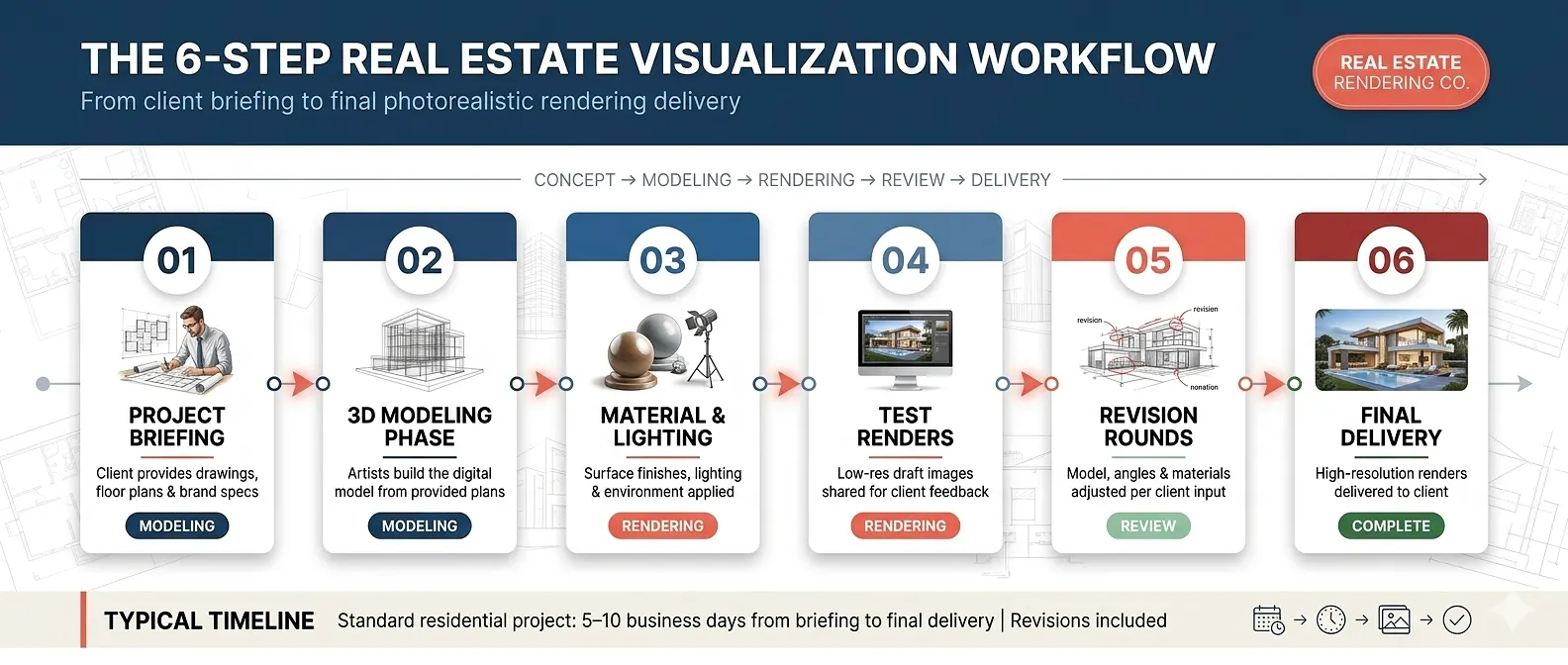
The difference between 3D rendering and 3D modeling is important to understand – but equally important is recognizing that neither process works in isolation. In a professional real estate visualization studio, modeling and rendering are sequential steps within a single unified workflow.
The Typical Real Estate Visualization Workflow
- Project briefing – the client provides architectural drawings, floor plans, and brand specifications
- 3D modeling phase – artists build the digital model of the property based on the provided plans
- Material and lighting setup – the rendering artist applies surface finishes, lighting, and environment
- Test renders – low-resolution draft images are produced and shared with the client for feedback
- Revision rounds – adjustments to the model, camera angles, or materials are made based on client input
- Final high-resolution rendering – the approved scene is rendered at full resolution and delivered
This workflow is exactly what the team at The Real Estate Rendering Company follows for every project. If you are curious about what drives developers to invest in this process, our guide on why real estate developers should use the 3D renderings offers a detailed breakdown of the business case.
Why the Difference Between 3D Rendering and 3D Modeling Matters for Real Estate
Understanding both processes helps you in three very practical ways:
1. You Can Have More Informed Conversations with Your Visualization Studio
When you know the difference, you can ask the right questions. For example: Is the model already built from a previous project? Can existing models be updated rather than rebuilt from scratch? Knowing this can save time and money on repeat projects.
2. You Can Set Accurate Expectations Around Turnaround Times
A property that already has an existing 3D model will move through the rendering phase much faster than a project that requires both modeling and rendering from the ground up. Being aware of this distinction helps you plan your marketing timeline more accurately.
3. You Can Understand Pricing Structures More Clearly
Rendering pricing often depends on both the complexity of the modeling work required and the number and resolution of rendered outputs. Reviewing a real estate rendering price list becomes much easier when you understand exactly what each line item covers.
Common Mistakes When Confusing 3D Rendering and 3D Modeling
Several costly misunderstandings arise when clients confuse these two terms:
- Assuming a 3D model is a finished deliverable: A raw model file is not a photorealistic image. It still requires the full rendering process to produce the images you can use in marketing materials.
- Requesting ‘just a rendering’ without providing plans: If no model exists, one must be built first. Always provide accurate floor plans, elevations, and site plans before the project begins.
- Underestimating rendering time for complex models: Highly detailed models with many material layers, complex lighting setups, and high-poly furniture require significantly more rendering time per image.
- Choosing software based on modeling rather than rendering quality: A beautifully modeled scene rendered with a lower-quality engine will still produce inferior results. Rendering quality is often the bigger variable in the final output.
Expert Tips: Getting the Best Results from 3D Rendering and 3D Modeling
Here are practical tips from experienced architectural visualization professionals:
- Provide detailed reference materials: The more precise your architectural drawings and material specifications, the more accurate the final model and render will be. Ambiguity at the start leads to costly revisions later.
- Think about camera angles early: Where you want the camera positioned has a major influence on how the model needs to be built. Agree on key view angles before modeling begins to avoid unnecessary rework.
- Use rendering to test design decisions: 3D rendering is an incredibly effective tool for evaluating exterior cladding options, interior color palettes, and furniture layouts before committing to physical materials.
- Consider animated walkthroughs for large developments: A 60-90 second animated rendering gives potential buyers a complete sense of a property and is especially effective for off-plan sales campaigns.
- Partner with a specialized real estate rendering studio: General-purpose 3D studios often lack the deep understanding of property marketing that specialist firms bring. A team that focuses exclusively on real estate visualization understands exactly what makes buyers respond.
If you want to understand more about how rendering supports property sales, read our article on how to sell your properties faster with 3D renderings.
Choosing the Right Software: Modeling vs. Rendering Tools
Selecting the right software stack matters. Here is a practical overview of tools used at each stage:
| Software | Primary Use | Best For | Rendering Quality |
|---|---|---|---|
| Autodesk 3ds Max | 3D Modeling + Rendering | Complex architectural projects | High (with V-Ray) |
| SketchUp | 3D Modeling | Quick concept models | Medium (with Enscape) |
| Autodesk Revit | BIM Modeling | Architecture and engineering firms | Medium (native) |
| Blender | 3D Modeling + Rendering | Budget-conscious projects | High (with Cycles) |
| V-Ray | Rendering Engine | Photorealistic architectural images | Very High |
| Corona Renderer | Rendering Engine | Soft, natural lighting aesthetics | Very High |
| Lumion | Real-time Rendering | Fast renders and animations | High |
| Unreal Engine | Real-time Rendering | Interactive virtual tours | Very High |
If you want a deeper breakdown of software options specifically for real estate professionals, our guide to the best real estate 3D rendering software covers the leading tools in detail.
3D Modeling and Rendering for Commercial Real Estate
The combination of modeling and rendering is equally important for commercial real estate projects. Office buildings, retail centers, mixed-use developments, and hospitality properties all benefit from photorealistic visualization during the pre-construction marketing phase.
For commercial projects specifically, exterior renderings are often the first marketing asset produced – used in planning submissions, investor presentations, and pre-leasing campaigns. Our detailed resource on 3D exterior rendering for commercial real estate project covers the most frequently asked questions about this process.
According to the National Association of Realtors, properties that use professional visual marketing consistently attract higher buyer engagement and sell faster than those relying solely on traditional photography. For pre-construction properties where no physical product exists yet, 3D rendering is not just helpful – it is essential.
Ready to Bring Your Property Vision to Life?
Our team at The Real Estate Rendering Company delivers photorealistic 3D rendering services that help you sell properties faster and impress clients at every stage. Starting at just $79 — get your custom quote today.
Get a Free Quote →Conclusion
The difference between 3D rendering and 3D modeling comes down to this: modeling builds the digital structure, and rendering transforms it into the photorealistic images your marketing needs. Both processes are essential, both require specialized skills, and both work best when executed by an experienced visualization team that understands real estate.
Whether you are launching a residential development, pitching to investors, or simply trying to close deals faster, professional 3D rendering and modeling services give you a powerful competitive advantage. The best studios handle both steps seamlessly, so your only job is to brief the project and approve the results.
Frequently Asked Questions: 3D Rendering vs. 3D Modeling
Q1. What is the main difference between 3D rendering and 3D modeling?
The main difference between 3D rendering and 3D modeling is that modeling is the process of building a three-dimensional digital structure (the geometry of a building or space), while rendering is the process of converting that model into a photorealistic 2D image by applying lighting, materials, and camera settings.
Q2. Do I need both 3D modeling and 3D rendering for my real estate project?
Yes, in virtually every case. You need a 3D model before you can produce a rendering. If you are commissioning photorealistic property images, your visualization studio will complete both steps – the modeling work simply happens behind the scenes before the final images are delivered.
Q3. How long does each process take for a typical real estate project?
Modeling a standard residential property typically takes 1 to 3 days, depending on complexity. Rendering each image (once the model is approved) generally takes a few hours at high resolution. A complete project from briefing to final delivery typically spans 5 to 10 business days.
Q4. Which costs more: 3D modeling or 3D rendering?
For most real estate projects, the modeling phase is the more time-intensive step, particularly for complex or highly detailed properties. However, pricing is typically quoted as a package covering both stages together rather than billed separately. See our pricing guide for typical investment ranges across different project types.
Q5. Can I provide an existing 3D model for rendering only?
Yes. If you already have a 3D model from your architect or CAD software, many studios – including The Real Estate Rendering Company – can work directly from your existing files and proceed straight to the rendering phase, which can significantly reduce turnaround time and cost.
Q6. What file formats are used for 3D models in real estate?
Common 3D model file formats include .obj, .fbx, .max (3ds Max), .rvt (Revit), .skp (SketchUp), and .dwg (AutoCAD). Most professional rendering studios can import and work with all major formats.
Q7. Is there a difference between 3D rendering and 3D visualization?
These terms are often used interchangeably in the real estate industry. Technically, ‘3D visualization’ is the broader discipline that encompasses both modeling and rendering, while ‘3D rendering’ refers specifically to the image-generation step. In practice, most clients use both terms to mean the same thing: photorealistic property images.
Ready to experience the difference? contact us today and get a custom quote for your next project.