
Using 3D renderings in real estate social media campaigns means deploying photorealistic CGI assets – exterior visualizations, interior renders, 3D floor plans, and animated walkthroughs – as the primary visual content driving awareness, lead generation, and pre-sales conversion across Instagram, Facebook, LinkedIn, and Pinterest, specifically for pre-construction and off-plan developments where photography of the completed asset does not yet exist. Unlike conventional property photography, photorealistic architectural visualization allows developers and agents to launch full-scale social campaigns months or years before occupancy, generating qualified buyer interest, building project brand equity, and compressing pre-leasing timelines through visually compelling content that performs on every major platform’s algorithm. The strategic advantage is compounding: 3D renderings real estate social media content consistently outperforms photography-only campaigns because the same visualization asset can be reformatted, recomposed, and redistributed across every channel without reshooting.
Developers who understand this dynamic stop treating rendering as a one-time marketing deliverable. Instead, they treat it as a content production engine – one that fuels the entire social campaign from launch day through completion.
Working with a professional real estate rendering and visualization services provider that understands social media output specifications – not just architectural quality – is the critical difference between renders that perform and renders that sit unused in a marketing folder.
Why 3D Renderings Are Ideal for Real Estate Social Media
Before mapping out the platform-specific strategies, it is worth grounding the case in data. Real estate social media is no longer a brand awareness supplementary channel – it is a primary lead generation infrastructure.
Why 3D Renderings Are Ideal for
Real Estate Social Media
82%
use social media
403%
more inquiries with
video/3D walkthroughs
80%
of leads from social
96%
search online first
Key statistics driving this shift:
- 82% of real estate businesses currently use social media as a core marketing channel, according to NAR research cited by industry sources
- Listings with video generate 403% more inquiries than those without – and animated 3D walkthroughs function as the pre-construction equivalent of video
- Social media is projected to generate approximately 80% of real estate leads, with platform-driven discovery becoming the primary first touchpoint for buyers
- 96% of home buyers search for property online before engaging an agent – and social media platforms are increasingly where that search begins
For pre-construction and off-plan developments, conventional photography simply does not exist yet. 3D renderings fill that content gap completely – and they fill it with assets that can be visually superior to photographs of completed properties when produced at professional quality.
Furthermore, 3D rendered content has a structural advantage in social media algorithms: it is visually distinctive. The combination of perfect lighting, ideal composition, and aspirational staging that photorealistic rendering delivers is precisely the kind of scroll-stopping content that platforms reward with organic reach.
Which Rendering Types Work Best on Social Media?
Not every rendering format performs equally across social channels. Understanding the content strengths of each visualization type helps developers and marketing teams build campaigns that are both visually compelling and strategically efficient.
| Rendering Type | Social Media Suitability | Best Platforms | Primary Campaign Role |
|---|---|---|---|
| Exterior photorealistic still | Very High | Instagram, Facebook, Pinterest | Project launch, brand awareness, paid ads |
| Interior photorealistic still | Very High | Instagram, Pinterest, Facebook | Lifestyle marketing, unit-type campaigns |
| 3D floor plan render | High | Facebook, LinkedIn, Instagram carousel | Spatial understanding, product education |
| Aerial perspective render | High | Instagram, LinkedIn, Facebook | Scale and site context, investor targeting |
| Animated walkthrough (video) | Excellent | Instagram Reels, Facebook, YouTube | Immersive storytelling, retargeting ads |
| 360-degree panorama | High | Facebook 360, website embed | Interactive discovery, premium engagement |
| Before and after (CAD to render) | High | LinkedIn, Instagram | Developer authority, process storytelling |
The most versatile social media asset is a high-quality exterior photorealistic still: it works as a standalone feed post, as part of a carousel, as a paid ad creative, and as a story or reel background. Prioritizing this deliverable in the rendering brief ensures immediate social media utility.
Platform-by-Platform Strategy: Using 3D Renderings Effectively
Each major social media platform has distinct algorithm preferences, audience demographics, and content format requirements. A one-size-fits-all approach to deploying 3D renderings across platforms wastes content and underperforms. Here is how to optimize for each channel.
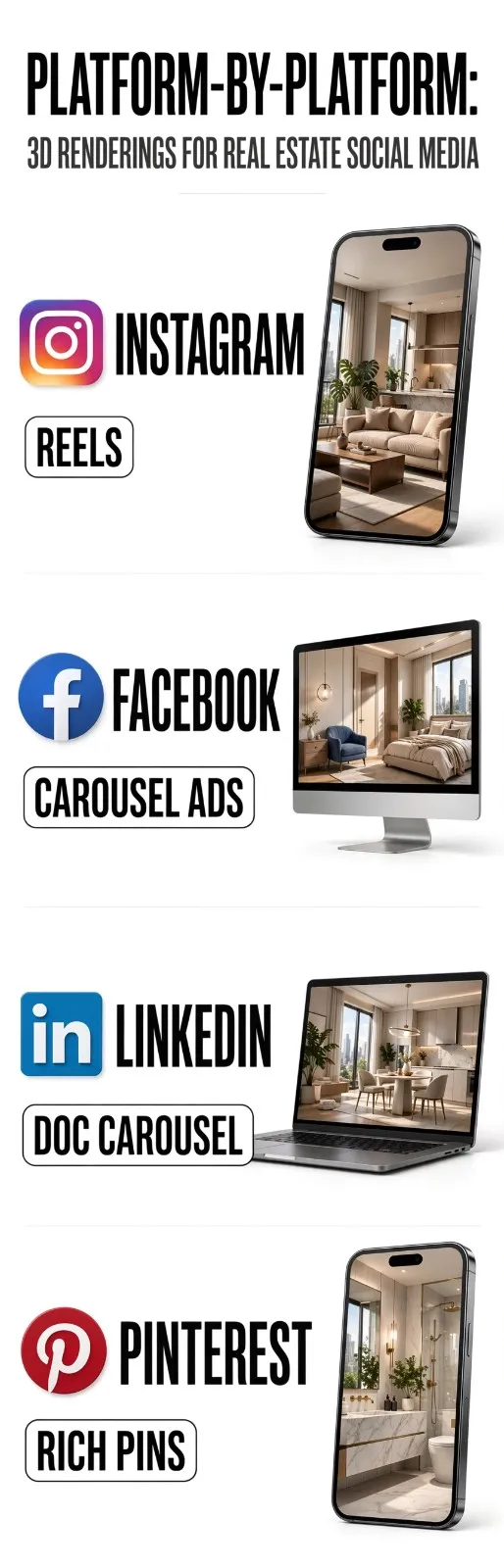
Instagram: Visual Storytelling for Buyer and Investor Audiences
Instagram remains the dominant platform for luxury residential and aspirational real estate visual content. Its algorithm rewards high-quality, visually distinctive content – exactly what professional 3D renderings provide.
Optimal content formats for Instagram:
- Feed posts (portrait 4:5 ratio): Use photorealistic exterior or interior renders at 1080 x 1350 pixels. Warm golden-hour renders and dusk shots consistently generate higher engagement than neutral daytime images because they stand out in the feed.
- Carousel posts: Sequence a project story – exterior approach, lobby, unit interior, amenity space, 3D floor plan – across 5-8 slides. Carousels generate 3x more engagement than single-image posts on Instagram due to swipe interactions signaling interest to the algorithm.
- Instagram Stories (9:16 ratio): Use renders with text overlays: “Coming Soon,” “Now Pre-Leasing,” “Units Available from [Date].” Stories support direct link-outs to landing pages – the primary social-to-lead conversion mechanism.
- Instagram Reels: Short (15-30 second) animated walkthroughs or render reveal transitions perform exceptionally well in Reels, combining the visual quality of 3D rendering with video’s algorithmic boost.
Caption strategy: Lead with a specific spatial or lifestyle detail from the render – “Floor-to-ceiling glazing on every bedroom, with unobstructed views” – rather than generic marketing language. Specificity drives saves and shares, which are high-authority engagement signals.
Facebook: Lead Generation and Targeted Advertising
Facebook’s advertising platform remains the most powerful tool for targeted real estate lead generation. 3D renderings are the optimal creative asset for Facebook paid campaigns because they are visually distinctive in a news feed dominated by photography.
Optimal content formats for Facebook:
- Single image ads (1:1 or 4:5 ratio): Exterior hero renders with project name, key selling point, and CTA overlay (“Register Your Interest”) perform consistently well in prospecting campaigns targeting demographics by income, location, and homeownership intent.
- Carousel ads: Use 3-5 renders showing different aspects of the development – exterior, key interior spaces, amenities, aerial site view – with each card captioned with a specific feature callout.
- Video ads from animated renders: A 15-30 second animated walkthrough rendered at 1080p serves as a highly effective retargeting creative for audiences who have visited the project website.
- Facebook 360 posts: Embed a 360-degree panoramic render as a native Facebook 360 photo – available through the same production workflow as standard rendering – for premium interactive engagement.
Targeting precision: Facebook’s ad targeting allows developers to reach users within specific geographic radii of the development site, filtered by household income thresholds, life stage signals (recent movers, newly married), and behavioral indicators of property purchase intent. 3D renderings give you the visual quality to justify that targeting investment.
LinkedIn: Investor, Developer, and Commercial Audience Engagement
LinkedIn serves a fundamentally different function in the real estate social media ecosystem. Rather than targeting buyers, LinkedIn campaigns using 3D renderings reach equity partners, institutional investors, commercial tenants, and industry peers.
Optimal content formats for LinkedIn:
Native image posts
Commercial exterior renders, aerial perspectives, and mixed-use development visualizations perform well as LinkedIn feed posts when accompanied by text that discusses the development’s market thesis, design intent, or pre-leasing progress.
Document carousel posts (PDF)
According to Oktopost, LinkedIn document carousels are consistently the highest-performing organic content format on the platform. A 10-15 slide PDF featuring project renders, site context, unit mix data, and market positioning functions as a mini investor deck and generates sustained organic reach well beyond the publication date.
Video content
Short animated building walkthroughs (30-60 seconds) perform strongly as LinkedIn video posts and can be repurposed from the same animated walkthrough commissioned for Instagram Reels.
Content framing for LinkedIn: Position renders as evidence of execution capability rather than lifestyle aspiration. Captions such as “Design development complete on [Project Name] – construction commencing [Month]. Pre-leasing now open for commercial ground floor tenants” attract commercial tenant inquiries and investor attention simultaneously.
Pinterest: Long-Tail Discovery and Design Inspiration Traffic
Pinterest functions as a search engine rather than a social feed. Real estate content on Pinterest drives long-tail discovery from buyers who are actively researching property types, architectural styles, and interior design concepts.
Optimal content formats for Pinterest:
- Standard pins (2:3 ratio): Interior renders, kitchen and bathroom visualizations, and exterior architectural details perform exceptionally well on Pinterest, where users save and organize aspirational home content.
- Rich Pins: Enable Rich Pins for real estate to attach project metadata directly to pinned renders, making them searchable by property type, location, and architectural style.
- Idea Pins: Multi-frame storytelling using a sequence of renders – exterior through interior – functions well as an Idea Pin format and receives algorithmic distribution to non-follower audiences.
Pinterest referral traffic to project websites from pinned renders can be substantial and highly qualified: users who discover a development through a saved interior render have already self-selected based on aesthetic and spatial preference.
Step-by-Step: Building a Social Media Campaign Around 3D Renderings
This is the production and publishing workflow that experienced development marketing teams use to deploy 3D rendering assets across social channels at launch.
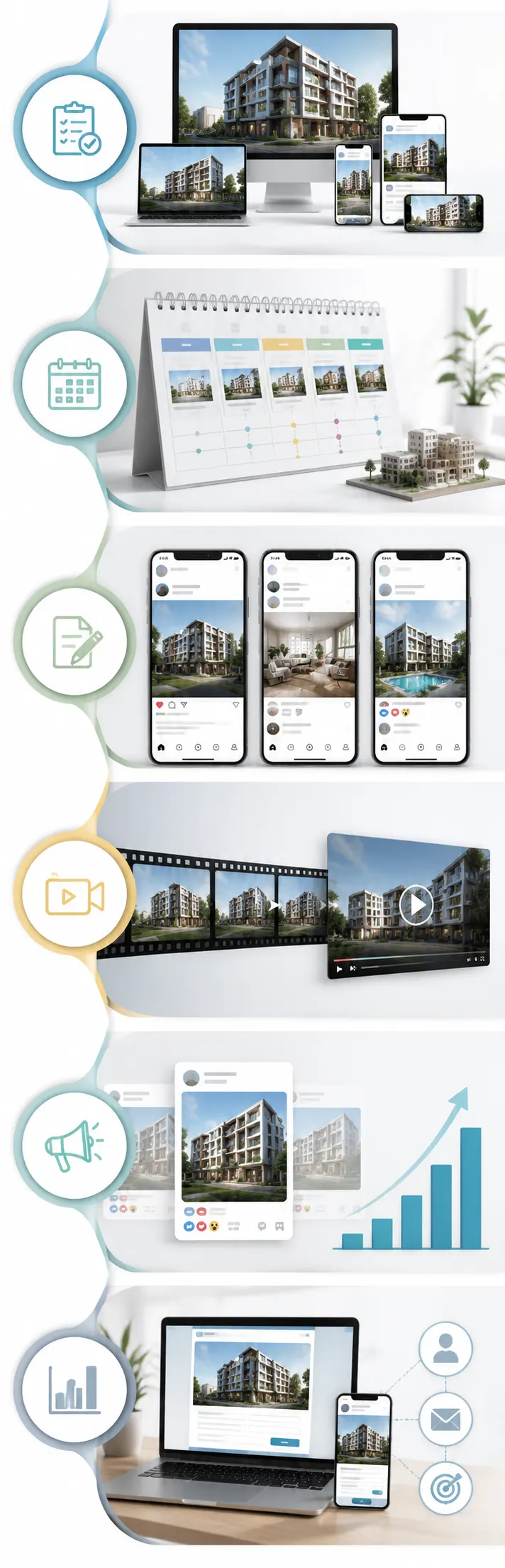
Step 1: Commission renders with social output specifications in the brief
Provide the rendering studio with explicit social media output requirements alongside standard print specifications. Request renders exported at:
- 1080 x 1350 pixels (Instagram and Facebook portrait feed)
- 1080 x 1080 pixels (square format for versatility)
- 1920 x 1080 pixels (16:9 for video backgrounds and YouTube)
- 2160 x 3840 pixels (4K master file for cropping and resizing flexibility)
This eliminates the most common issue: receiving renders sized for print brochures that perform poorly on mobile-first social platforms due to compression artifacts and poor aspect-ratio fit.
Step 2: Develop a channel-specific content calendar before launch
Map every rendering deliverable to a specific platform, post type, and campaign phase. A structured pre-launch calendar for a 50-unit residential development might include:
- Week 1: Project reveal exterior hero post across Instagram and Facebook
- Week 2: Instagram carousel – full project story (5 renders + 3D floor plan)
- Week 3: LinkedIn document carousel – investor and commercial leasing announcement
- Week 4: Pinterest board launch – interior design series
- Week 5: Facebook retargeting ad launch using exterior render creative
- Week 6: Instagram Reels and Facebook video using animated walkthrough
Step 3: Write platform-specific captions for every post
A single rendering should never receive the same caption on Instagram, LinkedIn, and Facebook. Each platform’s audience has different motivations and responds to different value propositions. Write distinct copy for each channel during the content planning phase.
Step 4: Produce native video from rendering assets
Most professional rendering studios can produce short animated walkthroughs, render reveal transitions, or Ken Burns-style zoom animations from static renders at a modest additional cost. These video assets unlock Reels, TikTok, YouTube Shorts, and Facebook video formats – substantially expanding the content output from the original rendering investment.
Step 5: Deploy paid amplification on top-performing organic posts
Monitor the first 24-48 hours of organic performance for each render post. Posts that generate above-average saves, shares, and profile visits signal audience resonance. Those specific renders should receive paid amplification budgets to extend reach to cold audiences matching the buyer or investor profile.
Step 6: Track conversions, not just engagement
Every social media post featuring a 3D rendering should link to a project-specific landing page with UTM tracking parameters. The key metrics to monitor are: landing page visits from social, lead form completions, and email list sign-ups – not likes and follower counts.
Formatting Renders Specifically for Social Media: Technical Specifications
One of the most common and preventable errors in real estate social media campaigns is deploying renders that were produced for print, planning, or large-format display without reformatting them for digital social platforms.
| Platform | Recommended Format | Optimal Resolution | Notes |
|---|---|---|---|
| Instagram Feed (portrait) | JPG or PNG, 4:5 ratio | 1080 x 1350 px | Highest feed real estate, mobile-first |
| Instagram Feed (square) | JPG or PNG, 1:1 ratio | 1080 x 1080 px | Versatile, consistent grid appearance |
| Instagram Stories / Reels | MP4 or JPG, 9:16 ratio | 1080 x 1920 px | Full-screen, direct link-out supported |
| Facebook Feed (image) | JPG or PNG, 4:5 or 1:1 | 1080 x 1350 px | Mobile-optimized feed display |
| Facebook Carousel (each card) | JPG, 1:1 | 1080 x 1080 px | Consistent crop across all cards |
| Facebook Video / Reels | MP4, 4:5 or 9:16 | 1080 x 1350 px | Auto-plays in feed, high CTR |
| LinkedIn Feed Image | JPG or PNG, 1.91:1 | 1200 x 627 px | Desktop-dominant, professional context |
| LinkedIn Document Carousel | PDF, 1:1 or 4:3 slides | 1080 x 1080 px per slide | Highest organic reach format on LinkedIn |
| Pinterest Standard Pin | JPG or PNG, 2:3 ratio | 1000 x 1500 px | Long-shelf-life discovery format |
A best practice when briefing a rendering studio is to request a “social media export package” alongside the primary marketing deliverables. For guidance on preparing your full documentation package before briefing a studio, the guide on how to prepare home plans for 3D exterior rendering provides a transferable checklist covering exactly what studios need to produce assets efficiently.
Content Series Ideas: Turning One Render into a Month of Social Content
A single high-quality 3D rendering is not one post. Applied strategically, a single hero exterior render can fuel an entire month of social content across multiple platforms. Here is how professional development marketing teams extract maximum value from each render:
From one exterior render:
- Standalone full-image post on Instagram (day 1)
- Cropped detail shot of the entry canopy or facade material (day 4)
- Behind-the-scenes: side-by-side CAD drawing vs. finished render (day 8)
- Animated slow zoom video version for Instagram Reels and Facebook (day 12)
- Included as slide 1 in a LinkedIn document carousel (day 15)
- Pinned to the project’s Pinterest board (day 18)
- Used as the hero creative in a Facebook paid ad (day 20)
- Re-shared with updated caption: “Progress update” or “X days to launch” (day 28)
This content atomization strategy means a rendering package of six to eight images produces 40-60 pieces of unique,
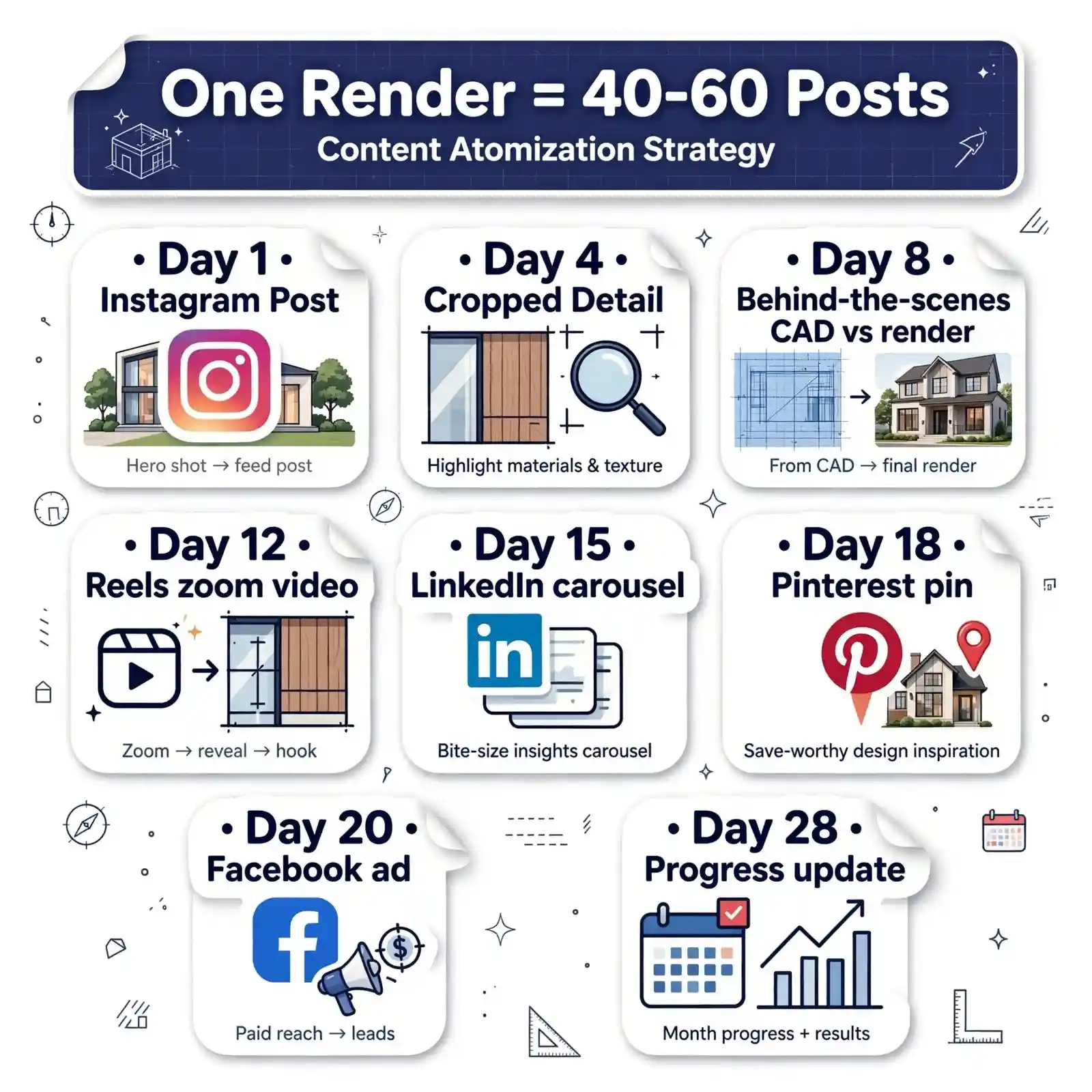
platform-native social content across a standard pre-sales campaign. The investment per content piece, when calculated this way, is dramatically lower than any other content production method.
The connection between rendering investment and sales velocity becomes clear when you understand this multiplier effect. Detailed analysis of how selling properties faster with 3D renderings works in practice reinforces this compounding return across marketing channels.
Common Mistakes Developers Make with 3D Renderings on Social Media
Even experienced development teams with high-quality renders consistently make the following errors in their social media execution.
Mistake 1: Posting the Same Image Across All Platforms Simultaneously
Deploying an identical image on Instagram, Facebook, and LinkedIn on the same day with the same caption is one of the most common and costly social media errors in real estate development marketing. Each platform’s algorithm interprets cross-platform posting patterns differently, and identical content rarely fits all platform context and audience expectations simultaneously.
Fix: Create platform-specific variations of the same render – different crops, different captions, different calls to action – and stagger the posting schedule across channels.
Mistake 2: Ignoring Mobile Optimization
More than 70% of social media consumption happens on mobile devices. A render produced at 3840 x 2160 pixels for a print brochure, when uploaded at that resolution directly to Instagram, often gets compressed and cropped in ways that destroy the visual quality the rendering studio produced.
Fix: Export separate mobile-optimized versions at platform-recommended resolutions before uploading. Never upload print-resolution files to social media platforms directly.
Mistake 3: Using Generic Captions
“Luxury apartments coming soon” is not a social media caption – it is a missed conversion opportunity. Every render post caption should answer a specific buyer question: What is the ceiling height? What floor does this unit type start on? What is the pre-registration deadline?
Fix: Write captions that lead with a specific spatial or lifestyle detail visible in the render, follow with one key development fact, and close with a single clear CTA.
Mistake 4: Not Building a Retargeting Audience Before Launch
Developers who launch paid social campaigns at project announcement without first building a warm retargeting audience pay significantly higher CPMs and generate lower-quality leads.
Fix: Start running low-budget awareness campaigns featuring renders three to four months before the formal project launch. Build retargeting audiences from early engagement, then convert them with direct response ads at launch.
Mistake 5: Treating Renders as Static Assets Only
Developers who commission only still renders and never produce video content from those assets leave the most algorithm-favored content format completely unused.
Fix: Budget for short (15-30 second) animated transitions or zooms from every exterior and interior render. The additional cost is typically 15-20% of the original render fee, and the video content unlocks Reels, Facebook video, YouTube Shorts, and TikTok.
Mistake 6: Not Connecting Rendering Quality to Brand Positioning
The quality of the renders in your social feed communicates your development team’s quality tier to every prospect and investor who views them. Mediocre renders on a premium project’s Instagram grid undermine the brand positioning the development deserves.
Fix: Align rendering investment with project positioning. A $50 million residential development should not be represented on social media by renders that look like concept sketches. Understanding why real estate developers use rendering services at a premium level is inseparable from understanding social media brand management.
Expert Tips: Maximizing Social Media Performance with 3D Renders
Golden-hour
& dusk variants
Capture warm natural light to boost engagement by 2x
Include human
figures
Adds scale & relatability, increases saves and shares
3D floor plans
as carousel slides
5-7
Break down the layout in slides 5-7 to drive swipe-throughs
Project-specific
Instagram
Highlights
Pin renders to Highlights for evergreen portfolio
LinkedIn document
carousels as
investor deck
Use multi-page PDF to showcase ROI & specs for investors
A/B test render
compositions
Test wide vs close-up to optimize click-through rate
1. Commission golden-hour and dusk variants of the hero exterior specifically for social media use.
Neutral daytime renders serve planning submissions and technical documentation well. But on social media feeds dominated by photography, a golden-hour or dusk exterior render stops scrolling in a way that a flat overcast daytime image does not. Request a dusk variant of your hero exterior render in the original brief – the marginal additional cost is 20-30% of the base render fee.
2. Include human figures in all renders intended for social use.
Renders without people read as cold and unpopulated to social media audiences who are evaluating lifestyle, not just architecture. Correctly scaled, naturally posed human figures in renders signal an active, vibrant community and significantly increase emotional engagement with the image.
3. Use 3D floor plans as Instagram carousel slide 5-7, not as standalone posts.
3D floor plans generate high-quality buyer intent signals – people who engage with floor plans are serious buyers, not passive scrollers. Place them within carousel sequences rather than as standalone posts to maximize their engagement contribution without sacrificing the visual lead image.
4. Create a project-specific Instagram highlight series from Stories.
Organize renders into named Highlight albums: “Exteriors,” “Interiors,” “Amenities,” “Floor Plans.” This creates a permanent, browsable visual catalog of the development on your Instagram profile – functioning as a social media showroom that new profile visitors explore before following or contacting.
5. Use LinkedIn document carousels as a complete project deck.
A LinkedIn PDF carousel featuring 10-15 project renders with key development data (location, GFA, unit mix, pre-leasing contacts) performs as a permanent, shareable investor deck on the platform. It generates saves, reshares, and direct messages from qualified investor and tenant audiences weeks after the original post date – long-tail organic distribution that static posts cannot achieve.
6. A/B test render compositions in paid ad campaigns.
Run parallel Facebook and Instagram paid campaigns using two render compositions – a warm dusk exterior versus a bright daytime interior – to the same target audience. The winning creative informs not just the paid campaign but the overall social content strategy. Data from the ad platform reveals which render style resonates most with your specific buyer demographic.
Measuring Social Media Campaign Performance for 3D Render Content
Every 3D render published on social media should be connected to measurable business outcomes. These are the specific KPIs that matter for pre-construction development campaigns:
| Metric | Platform | What It Tells You |
|---|---|---|
| Saves (Instagram) | High-intent signal: user is seriously considering the property | |
| Profile visits from post | Content driving brand discovery from cold audiences | |
| Link clicks | All platforms | Traffic driven to project landing page or pre-registration form |
| Lead form completions | Facebook/Instagram | Direct conversion attribution |
| Document carousel views (LinkedIn) | Investor and commercial tenant audience engagement depth | |
| Video completion rate | All platforms | Animated render resonance with the audience |
| Cost per lead (CPL) | Paid social | Efficiency of render creative in paid amplification |
| Landing page conversion rate | All platforms | Quality of audience driven by render content |
The key discipline: set up UTM parameters for every social media link before launch. This allows Google Analytics or your CRM to attribute leads correctly to specific renders, specific platforms, and specific campaigns – creating the data foundation for continuous creative optimization.
How Different Rendering Types Support Different Social Campaign Objectives
Understanding the relationship between rendering type and campaign objective prevents misallocation of visual content assets.
| Campaign Objective | Best Rendering Type | Platform | Why It Works |
|---|---|---|---|
| Project awareness – cold audience | Hero exterior, golden-hour or dusk | Instagram, Facebook paid | Visually distinctive, emotionally aspirational |
| Pre-registration lead capture | Exterior + floor plan carousel | Facebook/Instagram paid | Combines desire with practical spatial understanding |
| Investor interest generation | Aerial perspective + exterior | LinkedIn document carousel | Communicates scale, site, and execution quality |
| Commercial pre-leasing | Commercial exterior + lobby render | LinkedIn + Facebook | Shows operational environment, not just aesthetics |
| Sales team appointment booking | Interior render + lifestyle caption | Instagram + Facebook retargeting | Converts warm audiences already familiar with the project |
| Project brand building | Process content: CAD to render | LinkedIn + Instagram | Developer authority and execution storytelling |
For more context on what commercial projects need from rendering campaigns specifically, the 3D exterior rendering for commercial real estate FAQs resource covers the most common questions about commercial rendering deliverables and their marketing applications.
Frequently Asked Questions: 3D Renderings Real Estate Social Media
Can 3D renderings be used in real estate social media campaigns?
Yes. 3D renderings are the primary visual content format for pre-construction real estate social media campaigns. They allow developers to publish photorealistic images of a property before it is built, enabling full-scale campaigns on Instagram, Facebook, LinkedIn, and Pinterest months or years before occupancy. For pre-construction and off-plan developments, renders function as the complete visual marketing package.
What types of 3D renders perform best on Instagram for real estate?
Photorealistic exterior renders – particularly golden-hour and dusk lighting variants – consistently generate the highest engagement on Instagram for real estate content. Interior renders perform strongly in carousel sequences. Animated walkthroughs and render reveal videos perform well as Reels. The 4:5 portrait format at 1080 x 1350 pixels is the optimal size for feed posts.
How should 3D renders be formatted differently for each social platform?
Each platform has different optimal aspect ratios and resolutions: Instagram feed uses 4:5 (1080 x 1350 px), LinkedIn feed uses 1.91:1 (1200 x 627 px), Pinterest uses 2:3 (1000 x 1500 px), and Stories and Reels use 9:16 (1080 x 1920 px). Always request platform-specific export packages from your rendering studio rather than resizing a single master file, which often produces poor-quality results.
How many social media posts can one 3D rendering generate?
A single high-quality exterior render can generate 7-10 unique social media posts across platforms when deployed strategically: a feed post, a cropped detail post, a video zoom version, a carousel slide, a story, a paid ad creative, a Pinterest pin, and a LinkedIn post. A full rendering package of 6-8 images can realistically produce 40-60 pieces of platform-native content across a complete pre-sales campaign timeline.
Is it worth running paid social ads with 3D renders for real estate?
Yes. 3D renders are among the most effective paid social creative formats for real estate campaigns because they are visually distinctive in feeds dominated by photography. Facebook and Instagram paid campaigns using photorealistic render creatives consistently achieve strong CPL (cost per lead) metrics when targeting homebuyer and investor demographics. Dusk and golden-hour renders typically outperform daytime renders in paid ad A/B tests.
What is the biggest mistake developers make using renders on social media?
The most common and costly mistake is posting the same image on every platform simultaneously with the same caption. This ignores the distinct algorithm preferences, audience contexts, and format requirements of each platform and consistently underperforms a channel-specific deployment strategy. The second most common mistake is using print-resolution renders without mobile-optimizing them for social platforms.
How does LinkedIn differ from Instagram for real estate render campaigns?
LinkedIn serves a commercial, investor, and institutional audience rather than a residential buyer audience. Renders used on LinkedIn should be framed around development market thesis, investment credentials, and commercial leasing opportunities – not lifestyle aspiration. LinkedIn document carousels featuring project renders alongside financial and market positioning data are the highest-performing organic format on the platform for development companies.
Make 3D Renderings the Engine of Your Social Media Campaign
Using 3D renderings in real estate social media campaigns is not a matter of posting beautiful images and hoping for engagement. It is a structured content production and distribution strategy: commissioning renders with social output specifications in mind, reformatting assets for each platform’s algorithm preferences, building a sequenced content calendar, and measuring performance at every stage with conversion-oriented metrics.
B2B • Professional
Community • Engagement
Inspiration • Saved Pins
3D Rendering Engine
Visual Story • Reels • Stories
Reels
Short-Form Video • Reach
Ads
Paid Campaigns • Targeted
Structured Content Strategy
- Content pillars aligned to buyer journey
- Consistent messaging across channels
- Editorial calendar & workflow
Platform-Native Formatting
- Optimized sizes & formats for each channel
- Native styling for feed, stories, carousel
- Cohesive brand visuals
Conversion-Oriented Metrics
- Track impressions, saves, CTR, inquiries
- Real-time performance dashboard
- Optimize based on data
Leads = Proof of ROI
- Measure inquiries & qualified leads
- Attribute results to 3D content
- Demonstrate revenue impact
The developers who generate the strongest pre-sales results from social media are not necessarily those with the largest following or the biggest ad budget. They are the ones who approach 3D renderings real estate social media deployment with the same strategic discipline they apply to every other phase of the development. The renders become the engine. The platforms become the distribution infrastructure. And the leads become the proof that visualization investment delivers measurable business returns.
Ready to commission market-grade 3D visualizations that fuel a complete pre-construction social media campaign from launch through pre-sales? that deliver assets built to perform on every platform your buyers and investors actually use.
Start your project with Professional Real Estate Rendering Services →